AES256GCM1G-IP Reference Design
3.1 Set encryption/decryption key
3.2 Set encryption/decryption IV
3.3 Set AAD for Encryption/Decryption
1 Introduction
This document describes the detail of AES256GCM1G-IP reference design. In this reference design, AES256GCM1G-IPs are used to encrypt and decrypt data between two memories in FPGA and provide authentication tag. User can fill memory with Additional Authenticated Data (AAD), plain or cipher data patterns, set encryption/decryption key, Initialization Vector (IV), and control test operation via serial console on test PC. More details of the hardware design and CPU firmware are described as follows.
2 Hardware Overview
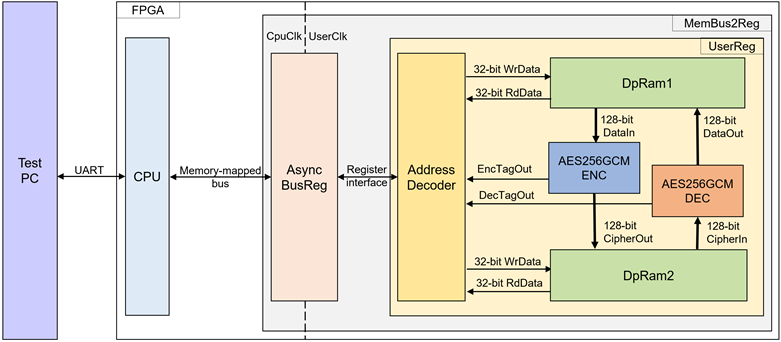
Figure 1 AES256GCM1G-IP reference design block diagram
In this test environment, two AES256GCM1G-IPs, called AES256GCMENC and AES256GCMDEC, interface with two dual-port RAMs with asymmetric ports, which are DpRam1 and DpRam2, as shown in Figure 1. AES256GCM1G-IPs and two RAMs are sub-modules in UserReg module within MemBus2Reg. CPU system is designed to interface with FPGA logic though memory-mapped bus (Avalon-MM) and interface with user through serial console in test PC.
For user control interface, there are registers in UserReg to store parameters from user such as encryption and decryption key, initialization vector (IV), number of AAD and data to encrypt or decrypt. Input parameters are received from user via serial console.
For user data interface, UserReg is designed to be able to write pattern data or read data in RAMs following user’s command and read encryption and decryption tag. DpRam1 is used to store encryption AAD and the plain data from user which will be input data for AES256GCMENC in encryption mode or the decrypted data which is output data from AES256GCMDEC in decryption mode. DpRam2 is used to store decryption AAD and the cipher data from user which will be input data for AES256GCMDEC in decryption mode or encrypted data which is output data from AES256GCMENC in encryption mode. Encryption/Decryption tag is stored in registers which user can read.
Because CPU system and AES256GCMENC/AES256GCMDEC run in different clock domain, AsyncBusReg module inside MemBus2Reg is designed as asynchronous circuit to support clock-crossing operation. Also, AsyncBusReg converts memory-mapped bus signal which is standard bus in CPU system to be register interface. The details of MemBus2Reg module are described below.
2.1 MemBus2Reg Module
The MemBus2Reg module interfaces with the CPU through a memory-mapped bus, such as Avalon-MM. The hardware registers within MemBus2Reg are mapped to specific CPU memory addresses, as shown in Table 1. These registers include control and status registers that enable the CPU to access and manage the module.
MemBus2Reg consists of two main sub-modules: AsyncBusReg and UserReg. The AsyncBusReg sub-module is responsible for converting the signals from the memory-mapped bus into a simple register interface that uses a 32-bit data bus, maintaining consistency with the bus’s data size. As shown in Figure 1, the MemBus2Reg module operates with two clock domains: CpuClk, which interfaces with the CPU, and UserClk, which operates in the user-defined clock domain. The AsyncBusReg sub-module includes circuitry to handle asynchronous communication between these two clock domains.
2.2 AsyncBusReg
This module is designed to convert the signal interface of a memory-mapped bus into a register interface. Also, it enables two clock domains, CpuClk and UserClk domain, to communicate.
To write register, RegWrEn is asserted to ‘1’ with the valid signal of RegAddr (Register address in 32-bit unit), RegWrData (write data of the register), and RegWrByteEn (the byte enable of this access: bit[0] is write enable for RegWrData[7:0], bit[1] is used for RegWrData[15:8], …, and bit[3] is used for RegWrData[31:24]).
To read register, AsyncBusReg asserts RegRdReq=‘1’ with the valid value of RegAddr (the register address in 32-bit unit). After that, the module waits until RegRdValid is asserted to ‘1’ to get the read data through RegRdData signal at the same clock.
2.3 UserReg
This module is designed to write/read data in RAMs, read tag, control and check status of AESGCM-IP corresponding with write register access or read register request from AsyncBusReg module. Memory map inside UserReg module is shown in Table 1. Timing diagram of register interface is shown in Figure 2.
Table 1 Register map Definition
|
Address offset |
Register Name |
Rd/Wr |
Description |
|
0x0000 |
ADDR_A1_REG |
Rd/Wr |
[6:0] – address A of DpRam1 (rAddrA1[10:4]). |
|
0x0004 |
ADDR_A2_REG |
Rd/Wr |
[6:0] – address A of DpRam2 (rAddrA2[10:4]). |
|
0x0008 |
ENC_AADCNT_REG |
Wr |
[15:0] – length of AAD for encryption (rEncAadInCount[15:0]). |
|
0x000C |
DEC_AADCNT_REG |
Wr |
[15:0] – length of AAD for decryption (rDecAadInCount[15:0]). |
|
0x0010 |
ENC_DATAINCNT_REG |
Rd |
[0] – AES256GCMENC busy status (wEncBusy). |
|
Wr |
[15:0] – length of plain data for encryption (rEncDataInCnt[15:0]). rEncStart is asserted to ‘1’ and encryption process is started. |
||
|
0x0014 |
DEC_DATAINCNT_REG |
Rd |
[0] – AES256GCMDEC busy status (wDecBusy). |
|
Wr |
[15:0] – length of cipher data for decryption (rDecDataInCnt[15:0]). rDecStart is asserted to ‘1’ and decryption process is started. |
||
|
0x0018 |
ENC_VER_REG |
Rd |
[31:0] – AES256GCMENC IP version (wEncVersion). |
|
0x001C |
DEC_VER_REG |
Rd |
[31:0] – AES256GCMDEC IP version (wDecVersion). |
|
0x0020 |
ENC_KEYIN_0_REG |
Rd/Wr |
[31:0] – Encryption key (rEncKeyIn[31:0]). |
|
0x0024 |
ENC_KEYIN_1_REG |
Rd/Wr |
[31:0] – Encryption key (rEncKeyIn[63:32]). |
|
0x0028 |
ENC_KEYIN_2_REG |
Rd/Wr |
[31:0] – Encryption key (rEncKeyIn[95:64]). |
|
0x002C |
ENC_KEYIN_3_REG |
Rd/Wr |
[31:0] – Encryption key (rEncKeyIn[127:96]). |
|
0x0030 |
ENC_KEYIN_4_REG |
Rd/Wr |
[31:0] – Encryption key (rEncKeyIn[159:128]). |
|
0x0034 |
ENC_KEYIN_5_REG |
Rd/Wr |
[31:0] – Encryption key (rEncKeyIn[191:160]). |
|
0x0038 |
ENC_KEYIN_6_REG |
Rd/Wr |
[31:0] – Encryption key (rEncKeyIn[223:192]). |
|
0x003C |
ENC_KEYIN_7_REG |
Rd/Wr |
[31:0] – Encryption key (rEncKeyIn[255:224]). |
|
0x0040 |
DEC_KEYIN_0_REG |
Rd/Wr |
[31:0] – Decryption key (rDecKeyIn[31:0]). |
|
0x0044 |
DEC_KEYIN_1_REG |
Rd/Wr |
[31:0] – Decryption key (rDecKeyIn[63:32]). |
|
0x0048 |
DEC_KEYIN_2_REG |
Rd/Wr |
[31:0] – Decryption key (rDecKeyIn[95:64]). |
|
0x004C |
DEC_KEYIN_3_REG |
Rd/Wr |
[31:0] – Decryption key (rDecKeyIn[127:96]). |
|
0x0050 |
DEC_KEYIN_4_REG |
Rd/Wr |
[31:0] – Decryption key (rDecKeyIn[159:128]). |
|
0x0054 |
DEC_KEYIN_5_REG |
Rd/Wr |
[31:0] – Decryption key (rDecKeyIn[191:160]). |
|
0x0058 |
DEC_KEYIN_6_REG |
Rd/Wr |
[31:0] – Decryption key (rDecKeyIn[223:192]). |
|
0x005C |
DEC_KEYIN_7_REG |
Rd/Wr |
[31:0] – Decryption key (rEncKeyIn[255:224]). |
|
0x0060 |
ENC_IVIN_0_REG |
Rd/Wr |
[31:0] – Encryption IV (rEncIvIn[31:0]). |
|
0x0064 |
ENC_IVIN_1_REG |
Rd/Wr |
[31:0] – Encryption IV (rEncIvIn[63:32]). |
|
0x0068 |
ENC_IVIN_2_REG |
Rd/Wr |
[31:0] – Encryption IV (rEncIvIn[95:64]). |
|
0x0070 |
DEC_IVIN_0_REG |
Rd/Wr |
[31:0] – Decryption IV (rDecIvIn[31:0]). |
|
0x0074 |
DEC_IVIN_1_REG |
Rd/Wr |
[31:0] – Decryption IV (rDecIvIn[63:32]). |
|
0x0078 |
DEC_IVIN_2_REG |
Rd/Wr |
[31:0] – Decryption IV (rDecIvIn[95:64]). |
|
0x0080 |
ENC_TAG_0_REG |
Rd |
[31:0] – Encryption tag (rEncTagOut[31:0]). |
|
0x0084 |
ENC_TAG_1_REG |
Rd |
[31:0] – Encryption tag (rEncTagOut[63:32]). |
|
0x0088 |
ENC_TAG_2_REG |
Rd |
[31:0] – Encryption tag (rEncTagOut[95:64]). |
|
0x008C |
ENC_TAG_3_REG |
Rd |
[31:0] – Encryption tag (rEncTagOut[127:96]). |
|
0x0090 |
DEC_TAG_0_REG |
Rd |
[31:0] – Decryption tag (rDecTagOut[31:0]). |
|
0x0094 |
DEC_TAG_1_REG |
Rd |
[31:0] – Decryption tag (rDecTagOut[63:32]). |
|
0x0098 |
DEC_TAG_2_REG |
Rd |
[31:0] – Decryption tag (rDecTagOut[95:64]). |
|
0x009C |
DEC_TAG_3_REG |
Rd |
[31:0] – Decryption tag (rDecTagOut[127:96]). |
|
0x2000~0x23FF |
PLAIN_BASE_ADDR |
Rd/Wr |
[31:0] – Plain data in DpRam1 (wRdDataB1). |
|
0x2400~0x27FF |
ENC_AAD_BASE_ADDR |
Rd/Wr |
[31:0] – Encryption AAD in DpRam1 (wRdDataB1). |
|
0x4000~0x43FF |
CIPHER_BASE_ADDR |
Rd/Wr |
[31:0] – Cipher data in DpRam2 (wRdDataB2). |
|
0x4400~0x47FF |
DEC_AAD_BASE_ADDR |
Rd/Wr |
[31:0] – Decryption AAD in DpRam2 (wRdDataB2). |
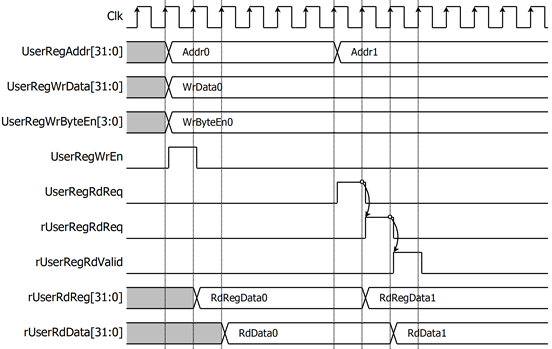
Figure 2 Register interface timing diagram
To read register, one multiplexer is designed to select the read data within each address area. UserRegAddr[10:2] is applied in each register area to select the data. Next, the address decoder uses UserRegAddr[15:13] to select the read data from each area for returning to CPU. As shown in Figure 2, read data is valid in next two clock cycles. When UserRegRdReq is active, rUserRegRdReq is asserted to ‘1’. Then rUserRdValid is active with the valid read value of UserRegAddr.
To write register, UserRegWrEn is asserted to ‘1’ with the valid of UserRegAddr. UserRegAddr[15:13] are used to decode that CPU accesses dual-port ram (DpRam) or internal register area. When CPU accesses DpRam (UserRegAddr[15:13]=“001” or “010”), UserRegAddr[10:2] are set to be the address of DpRam. For example, when UserRegAddr[15:0]=0x2004 and UserRegWrEn=’1’, DpRam1 will be filled with UserRegWrData at Address 0x01. Otherwise, UserRegWrData is loaded to internal register which has matched UserRegAddr[10:0]. For example, rAddrA1 is loaded by UserRegWrData when UserRegAddr=0x0000.
UserRegWrByteEn signal is used when CPU firmware needs to access DpRam by using 32-bit, 16-bit or 8-bit pointer. UserRegWrByteEn[3:0] is mapped to Byte Write Enable port of DpRam.
In this reference design, there are three main operations which are parameter setting, encryption/decryption/bypass. Each operation is described as follows.
2.3.1 Key setting
For key setting, rKeyIn is configured by writing to the registers KEYIN_7_REG through KEYIN_0_REG. The key size is selected using the rKeyInSize signal, where rKeyInSize='1' sets the key to 256-bit, and rKeyInSize='0' sets it to 128-bit. This is done by writing to the KEYSIZE_REG. The key is then set up in AESGCM-IP by asserting rKeyInValid, which is done by writing to the KEYIN_VALID_REG as shown in Figure 3.
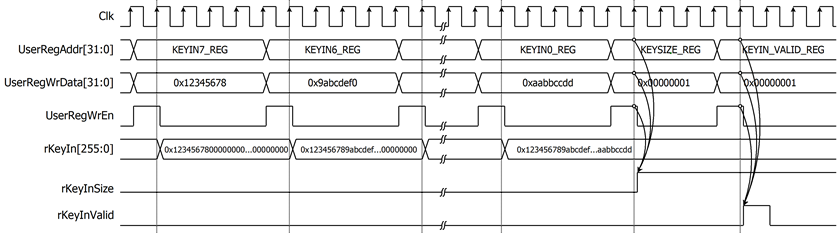
Figure 3 Timing diagram of key setting process
2.3.2 Parameter setting
For encryption process, encryption key, encryption IV and length of encryption AAD are set by writing ENC_KEYIN_0_REG to ENC_KEYIN_7_REG, ENC_IVIN_0_REG to ENC_IVIN_2_REG and ENC_AADCNT_REG, respectively. AAD and plain data, which will be input data for AES256GCMENC, are stored in DpRam1. In case of non-zero length AAD, address A of DpRam1 (rAddrA1) is set to 0x40 to access the first AAD data by writing ADDR_A1_REG. Encrypted data from AES256GCMENC is stored in DpRam2. Before starting encryption process, address A of DpRam2 (rAddrA2) is set to 0x00 for writing the first output encrypted data by writing ADDR_A2_REG. For setting length of plain data, rEncDataInCnt, ENC_DATAINCNT_REG is written and then rEncStart is asserted to ‘1’ to start encryption as shown in Figure 4.
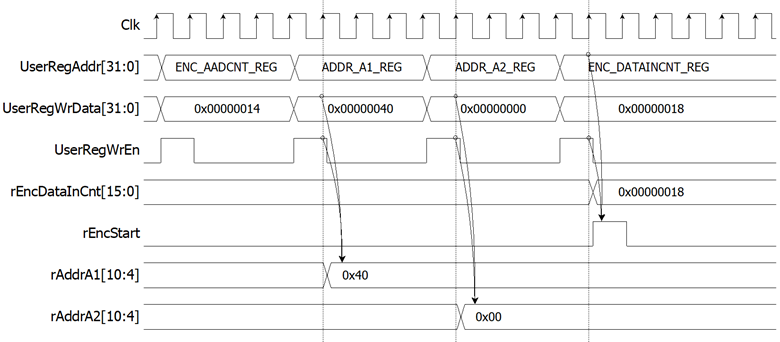
Figure 4 Timing diagram example of encryption parameter setting
For decryption process, decryption key, decryption IV and length of decryption AAD are set by writing DEC_KEYIN_0_REG to DEC_KEYIN_7_REG, DEC_IVIN_0_REG to DEC_IVIN_2_REG and DEC_AADCNT_REG respectively. AAD and cipher data, which will be input data for AES256GCMDEC, are stored in DpRam2. In case of non-zero length AAD, address A of DpRam2 (rAddrA2) is set to 0x40 to access the first AAD data by writing ADDR_A2_REG. Decrypted data from AES256GCMDEC is stored in DpRam1. Before starting decryption process, address A of DpRam1 (rAddrA1) is set to 0x00 for writing the first output decrypted data by writing ADDR_A1_REG. For setting length of cipher data, rDecDataInCount, DEC_DATAINCNT_REG is written and then rDecStart is asserted to ‘1’ to start decryption as shown in Figure 5.
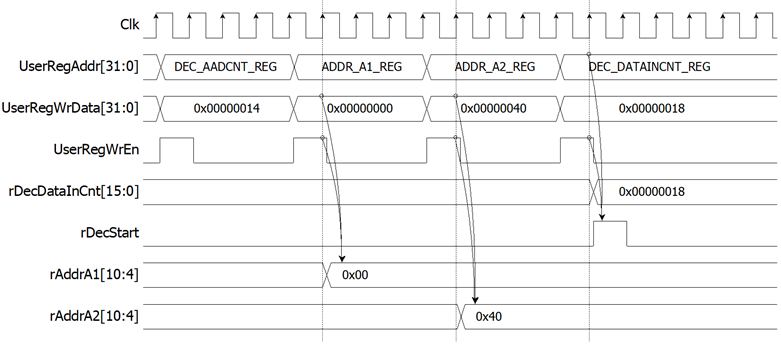
Figure 5 Timing diagram example of decryption parameter setting
2.3.3 Encryption
For encryption process, in case of non-zero length AAD, rAddrA1 is set to the first address of AAD and rEncAadCnt is set to be the number of 128-bit AAD. When wEncDataInRd is active, rAddrA1 is increased by 1 to access next 128-bit AAD and rEncAadCnt is decreased by 1 as the remaining 128-bit AAD to read. When rEncAadCnt=1 and wEncDataInRd=‘1’, the last 128-bit AAD is read, rAddrA1 is reset to 0x00 to access the first plain data. When wEncDataInRd is active, rAddrA1 is increased by 1 to access next 128-bit plain data.
When wEncCipherOutValid is active, wEncCipherOut is loaded to DpRam2. Then rAddrA2 is increased by 1 prepared for next encrypted output as shown in Figure 6.
Encryption tag (wEncTagOut) is stored in register when wEncTagOutValid is active as shown in Table 1. User can access the encryption tag by readding ENC_TAG_0_REG to ENC_TAG_7_REG.
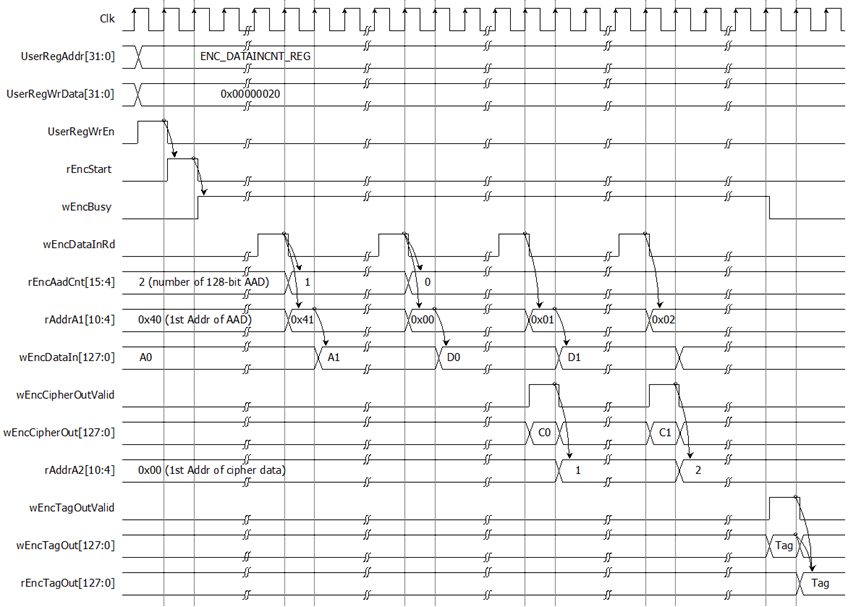
Figure 6 Timing diagram of encryption process
2.3.4 Decryption
For decryption process, in case of non-zero length AAD, rAddrA2 is set to the first address of AAD. and rDecAadCnt is set to be the number of 128-bit AAD. When wDecCipherInRd is active, rAddrA1 is increased by 1 to access next 128-bit AAD and rEncAadCnt is decreased by 1 as the remaining 128-bit AAD to read. When rDecAadCnt=1 and wDecCipherInRd=‘1’, the last 128-bit AAD is read, rAddrA2 is reset to 0x00 to access the first cipher data. When wDecCipherInRd is active, rAddrA2 is increased by 1 to access next 128-bit cipher data.
When wDecDataOutValid is active, wDecDataOut is loaded to DpRam1. Then rAddrA1 is increased by 1 prepared for next decrypted output as shown in Figure 7.
Decryption tag (wDecTagOut) is stored in register when wDecTagOutValid is active as shown in Table 1. User can access the decryption tag by readding DEC_TAG_0_REG to DEC_TAG_7_REG.
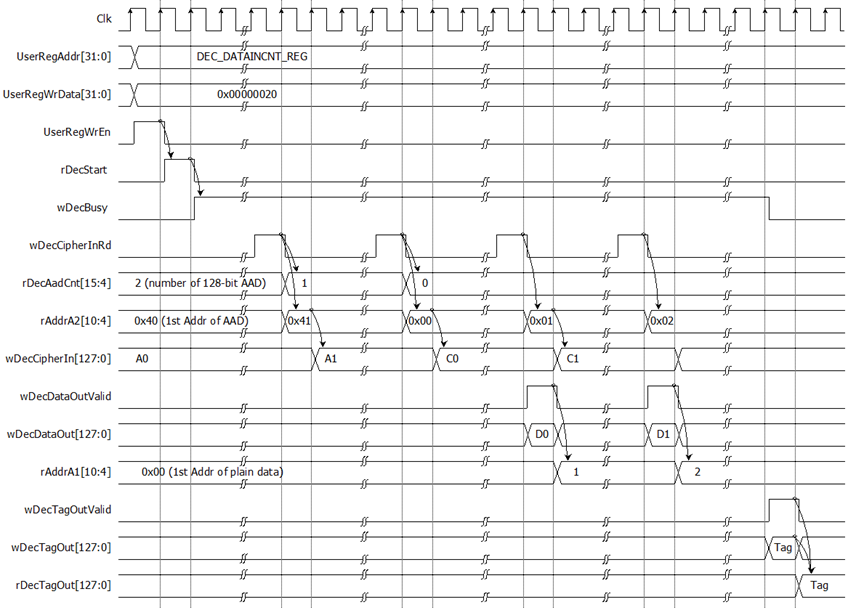
Figure 7 Timing diagram of decryption process
3 CPU Firmware
3.1 Set encryption/decryption key
This menu is used to set encryption/decryption key. The sequence of the firmware is as follows.
1) Call change_key_set function to change encryption/decryption key set. User can input “enter” key to skip input encryption key and not change current enc_key_set or to skip input decryption key and change dec_key_set similar to enc_key_set.
2) Call set_enc_key function and set_dec_key function inside change_key_set function to set enc_key_set and dec_key_set to mapped registers.
change_key_set function, set_enc_key function and set_dec_key function is described in Table 2, Table 3 and Table 4, respectively.
Table 2 change_key_set function
|
void change_key_set(unsigned int *enc_key_set, unsigned int *dec_key_set) |
|
|
Parameter |
enc_key_set: pointer of array storing 256-bit encryption key dec_key_set: pointer of array storing 256-bit decryption key |
|
Return value |
None |
|
Description |
This function displays current encryption key on the console. Receive input new encryption key in hexadecimal format or “enter” key to skip. User’s input will be ignored if it is not hexadecimal format. The encryption/decryption key is stored in enc_key_set/dec_key_set. Then set_enc_key function and set_dec_key function is called, respectively. |
Table 3 set_enc_key set function
|
void set_enc_key(unsigned int *enc_key_set) |
|
|
Parameter |
enc_key_set: pointer of array storing 256-bit encryption key |
|
Return value |
None |
|
Description |
This function sets 256-bit encryption key to mapped registers. Before setting, AES256GCMENC status is monitored until the last operation is completed (*ENC_DATAINCNT_REG=0) then set the registers. |
Table 4 set_dec_key set function
|
void set_dec_key(unsigned int *dec_key_set) |
|
|
Parameter |
dec_key_set: pointer of array storing 256-bit decryption key |
|
Return value |
None |
|
Description |
This function sets 256-bit decryption key to mapped registers. Before setting, AES256GCMDEC status is monitored until the last operation is completed (*DEC_DATAINCNT_REG=0) then set the registers. |
3.2 Set encryption/decryption IV
This menu is used to set encryption/decryption IV by calling set_iv function. set_iv function is described in Table 5.
Table 5 set_iv function
|
void set_iv(unsigned int *enc_iv_set, unsigned int *dec_iv_set) |
|
|
Parameter |
enc_iv_set: pointer of array storing 96-bit encryption IV dec_iv_set: pointer of array storing 96-bit decryption IV |
|
Return value |
None |
|
Description |
This function displays current encryption IV on the
console. Receive input new encryption IV in hexadecimal format or “enter” key
to skip. User’s input will be ignored if it is not hexadecimal format. The
encryption/decryption IV |
3.3 Set AAD for Encryption/Decryption
This menu is used to set the length of encryption/decryption AAD, fill DpRam1 with encryption AAD pattern and fill DpRam2 with decryption AAD pattern. The sequence of the firmware is as follows.
1) Receive the length of AAD in byte unit or “enter” key to set AAD length to zero. The length of AAD is stored in aad_cnt which is used for both encryption and decryption.
2) Call fill_data function to choose encryption AAD pattern and fill DpRam1 with selected pattern. The input parameters of fill_data are ENC_AAD_BASE_ADDR which is the first address for encryption AAD in DpRam1 and aad_cnt. fill_data function is described in Table 6.
3) Call show_data function to show AAD data for both encryption AAD and decryption AAD corresponding to aad_cnt. show_data function is described in Table 7.
4) Call fill_data function to choose decryption AAD pattern and fill DpRam2 with selected pattern. The input parameters of fill_data is DEC_AAD_BASE_ADDR which is the first address for decryption AAD in DpRam1 and aad_cnt.
5) Call show_data function to show AAD data for both encryption AAD and decryption AAD corresponding to aad_cnt.
Table 6 fill_data function
|
void fill_data(unsigned int base_addr, unsigned int data_length) |
|
|
Parameter |
base_addr: base address to access memory data_length: length of data to fill data pattern |
|
Return value |
None |
|
Description |
This function fills the selected pattern in memory corresponding to base_addr. Before filling memory, the function shows data pattern choices on serial console and waits for user’s input. For invalid choice, the console will display the error message and wait until user input new valid choice. Then selected data pattern is filled into memory by the length of data (data length) and filled zeros into the remaining memory from address base_addr+0x0000 to base_addr+0x03FF. |
3.4 Show Data Memory
This menu is used to show data in memory. AAD will be shown by the number of AAD that user already set. User can set the number of data to show on console in byte unit. The sequence of the firmware is as follows.
1) Call show_data function to show AAD in memory with ENC_AAD_BASE_ADDR and aad_cnt as its parameters.
2) Receive the length of data in decimal format or “enter” key to use default value. If user input ‘0’, the length of data to show will be default value. The length of data to show is stored in length.
3) Call show_data function to show data in memory with PLAIN_BASE_ADDR and length as its parameters.
Table 7 show_data function
|
void show_data(unsigned int base_addr, unsigned int length) |
|
|
Parameter |
base_addr: base address to access memory length: length of data to show |
|
Return value |
None |
|
Description |
This function shows data in both DpRam1 and DpRam2 corresponding to length. CPU firmware reads data in DpRam1, starting at base_addr, and shows on console. Also, CPU firmware reads data in DpRam2, starting at base_addr + 0x2000, and shows on console. If length is too large, length will be set to the size of memory. |
3.5 Fill Plain Data Memory
This menu is used to fill DpRam1 with plain data pattern. The sequence of the firmware is as follows.
1) Receive the length of plain data in decimal format or “enter” key to set length of data to zero. The number of data to encrypt is stored in enc_data_cnt.
2) Call fill_data function to choose data pattern and fill DpRam1 with selected pattern. The input parameter of fill_data is PLAIN_BASE_ADDR which is base address for DpRam1 and enc_data_cnt.
3) Call show_data function to show data in both DpRam1 and DpRam2 corresponding to enc_data_cnt.
According to Table 6, there are four data pattern choices to fill memory that are zero pattern, 8-bit counter pattern, 16-bit pattern and 32-bit pattern. For zero pattern, user can select this choice to clear data memory. It makes user see the output of encryption/decryption more clearly.
3.6 Encrypt Data
This menu is used to start encryption process with current encryption parameters. The sequence of the firmware is as follows.
1) Call aes_command function to set mode of operation, the starting address, number of AAD and data to encrypt and check status. aes_command function is described in Table 8.
2) Print AAD length and call show_data function to show AAD in memory by the number of encryption AAD.
3) Print plain data length and call show_data function to show data in memory by the number of plain data.
4) Call show_tag function to display encryption tag. show_tag function is described in Table 9.
Table 8 show_data function
|
void aes_command(unsigned char mode, unsigned int *AADCNT_REG, unsigned int aad_cnt, unsigned int *DATACNT_REG, unsigned int data_cnt) |
|
|
Parameter |
mode: mode of operation, 0 for encryption and 1 for decryption AADCNT_REG: register for AAD length aad_cnt: the number of AAD to operate DATACNT_REG: register for data length data_cnt: the number of data to operate |
|
Return value |
None |
|
Description |
This function sets the number of AAD by writing register AADCNT_REG with aad_cnt and sets the starting address of DpRam1 and DpRam2 by writing register ADDR_A1_REG and ADDR_A2_REG, respectively. Then DATACNT_REG is written with data_cnt to set the number of data to operate. Also, DATACNT_REG is monitored to check whether operation finish. When operation finished, *CMD_REG=0 which means AES256GCM1GIP is not busy (*DATACNT_REG[0]= ‘0’). |
Table 9 show_tag function
|
void show_tag(unsigned int *TAG_REG) |
|
|
Parameter |
TAG_REG: register for reading authentication tag |
|
Return value |
None |
|
Description |
This function reads authentication tag from TAG_REG to TAG_REG+0x000F and prints tag on serial console. |
3.7 Loop verification
This menu is used to verify both encryption and decryption with the current encryption and decryption parameters by calling loop_verify function which is described in Table 9.
Table 10 loop_verify function
|
int loop_verify(unsigned int aad_cnt, unsigned int data_cnt) |
|
|
Parameter |
aad_cnt: the number of AAD for encryption and decryption data_cnt: the number of data for encryption and decryption |
|
Return value |
Int: 0 for verification succeeded and -1 for verification failed |
|
Description |
This function reads and stores plain data from DpRam1 for verification. Data in DpRam2 is cleared. aes_command function is called to encrypt plain data in DpRam1 with current encryption parameters. Then data in DpRam1 is cleared and aes_command function is called to decrypt data in DpRam2 with current decryption parameters. The decrypted data is compared with plain data before encryption process and decryption tag is compared with encryption tag. Verification result will be printed on serial console. |
3.8 Fill Cipher Data Memory
This menu is used to fill DpRam2 with cipher data pattern. The sequence of the firmware is as follows.
1) Receive the length of cipher data in decimal format or “enter” key to set length of data to zero. The number of data to decrypt is stored in dec_data_cnt.
2) Call fill_data function to choose data pattern and fill DpRam2 with selected pattern. The input parameter of fill_data is CIPHER_BASE_ADDR which is base address for DpRam2 and dec_data_cnt.
3) Call show_data function to show data in both DpRam1 and DpRam2 corresponding to dec_data_cnt.
3.9 Decrypt
This menu is used to start decryption process with current decryption parameters. The sequence of the firmware is as follows.
1) Call aes_command function to set mode of operation, the starting address, number of AAD and data to decrypt and check status.
2) Print AAD length and call show_data function to show AAD in memory by the number of decryption AAD.
3) Print cipher data length and call show_data function to show data in memory by the number of cipher data.
4) Call show_tag function to display decryption tag.
4 Revision History
|
Revision |
Date (D-M-Y) |
Description |
|
1.00 |
8-Dec-25 |
Initial version release |