QUIC10GCUC-IP Reference Design
2.2.1 Storing certificate information
2.2.2 Key material information
2.2.6 Memory allocation for user streams
2.2.7 HTTP/3 minimum stream requirement compliance
2.3.1 Ethernet Hard IP on Agilex 5
3.7 Show certificate information
3.9 Download data pattern with HTTP GET command
3.10 Upload data pattern with HTTP POST command
3.11 Upload and Download data pattern like secnetperf
1 Introduction
This document describes the details of the QUIC Client 10 Gbps Under-Clocking IP core (QUIC10GCUC-IP) reference design. In this reference design, the QUIC10GCUC-IP is used as a medium to transfer data within a secure connection following the QUIC transport protocol version 1 standard (RFC9000). This process involves handling the TLS 1.3 handshake and dealing with data encryption/decryption and flow control. Users can set network parameters, download and upload payloads to the server by inputting supported command via the serial console. Further details regarding the hardware design and CPU firmware are provided below.
2 Hardware overview
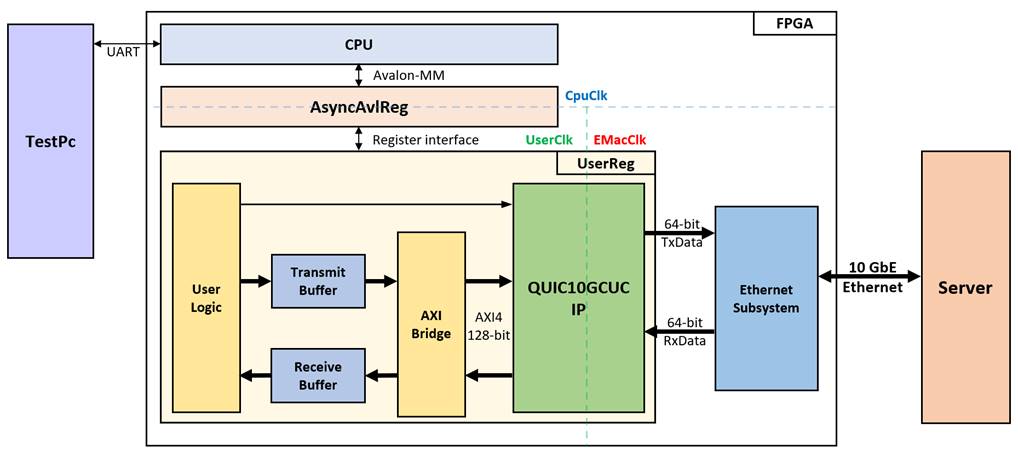
Figure 1 QUIC10GCUC-IP reference design block diagram
In this test environment, two devices are used to transfer data over a 10G Ethernet connection. The FPGA acts as the QUIC Client, while the target device, which can be either a PC or another FPGA, acts as the QUIC Server. As shown in Figure 1, the QUIC10GCUC-IP is integrated within UserReg. UserReg connects to the CPU through AsyncAvlReg using a register interface, and the CPU connects to AsyncAvlReg via an Avalon-MM interface.
The user interface of the QUIC10GCUC-IP connects to AXIBridge via an AXI4 interface for reading data from the Transmit Buffer and writing data to the Receive Buffer. The user logic is responsible for generating the sending data, verifying the receiving data, and other user control operations for the QUIC10GCUC-IP.
There are three system clocks in this reference design, i.e., CpuClk, UserClk and EMacClk. CpuClk is used to interface with CPU through Avalon-MM bus. UserClk is the clock domain on which the QUIC10GCUC-IP operates and interfaces with users. EMacClk is the clock domain which is synchronous to EMAC interface.
To achieve 10 Gbps throughput using the QUIC10GCUC-IP, a UserClk frequency of 100 MHz is recommended, as implemented in this reference design.
The details of each module are described as follows.
2.1 AsyncAvlReg
This module is designed to convert the signal interface of Avalon-MM to be register interface. Also, it enables two clock domains to communicate.
To write register, RegWrEn is asserted to ‘1’ with the valid signal of RegAddr (Register address in 32-bit unit), RegWrData (write data of the register), and RegWrByteEn (the byte enable of this access: bit[0] is write enable for RegWrData[7:0], bit[1] is used for RegWrData[15:8], …, and bit[3] is used for RegWrData[31:24]).
To read register, AsyncAvlReg asserts RegRdReq=’1’ with the valid value of RegAddr (the register address in 32-bit unit). After that, the module waits until RegRdValid is asserted to ‘1’ to get the read data through RegRdData signal at the same clock.
The address of Register interface is shared for both write and read transactions, so user cannot write and read the register at the same time. The timing diagram of the Register interface is shown Figure 2.
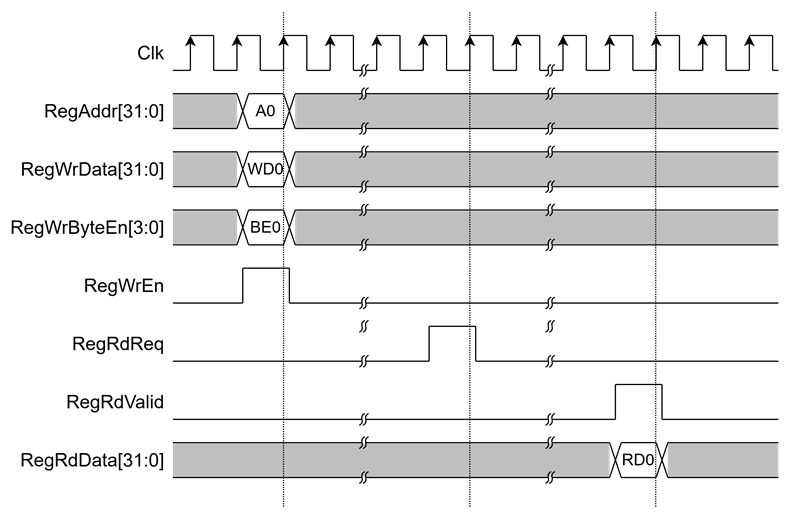
Figure 2 Register interface timing diagram
2.2 UserReg
For register file, UserReg is designed to write/read registers, control and check alert of the QUIC10GCUC-IP corresponding with write register access or read register request from AsyncAvlReg module. The memory map inside UserReg module is shown in Table 1.
Table 1 Register map Definition of QUIC10GCUC-IP
|
Register Name |
Description |
|
|
0x0060 |
EMAC_VER_INTREG |
Rd[31:0]: Ethernet MAC version number (MacIPVersion). |
|
0x0064 |
EMAC_STS_INTREG |
Rd[0]: Ethernet link-up status (MacLinkup). |
|
QUIC10GCUC Control register |
||
|
0x0100 |
QUIC_RSTB_REG |
Wr/Rd[0]: Reset signal active low (rQUICRstBOut). |
|
0x0104 |
QUIC_CONN_REG |
Wr/Rd[0]: User’s Connection status (rQUICConnOn). Wr/Rd[1]: User’s enable signal to attempt opening a connection with 0-RTT (rQUICTryZeroRTT). |
|
0x0108 |
QUIC_BUSY_REG |
Rd[3]: Data receive busy status (QUICRxTrnsBusy). Rd[2]: Data transmit busy status (QUICTxTrnsBusy) Rd[1]: Handshake busy status (QUICHandshakeBusy). Rd[0]: Connection busy status (QUICConnOnBusy). |
|
0x010C |
QUIC_ALERT_REG |
Rd[15:0]: Alert and status code (QUICAlertCode[15:0]). |
|
0x011C |
QUIC_VER_REG |
Rd[31:0]: QUIC10GCUC-IP version (QUICIPVersion[31:0]). |
|
QUIC User Data |
||
|
0x0200- |
QUIC_TX_USER_PTR_REG[X] |
Rd[15:0]: Read pointer of streamID ‘X’ to indicate the first byte position of TxData that IP will process (wAppTxRdAddr[((X+1)*16)-1:X*16]). Wr[15:0]: Write pointer of streamID ‘X’ to indicate the position after the last TxData written (rAppTxWrAddr[((X+1)*16)-1:X*16]). |
|
0x0240- |
QUIC_TX_USER_FINAL_REG[X] |
Wr[0]: Set the end stream flag of the current Tx write pointer for StreamID ‘X’ (rAppTxWrFin[X]) |
|
0x0280- |
QUIC_RX_USER_PTR_REG[X] |
Rd[15:0]: Write pointer of streamID ‘X’ to indicate the position after the last RxData written (wAppRxWrAddr[((X+1)*18)-1:X*18]). Wr[18:0]: Read pointer of streamID ‘X’ to indicate the first byte of RxData that user will process (rAppRxRdAddr[((X+1)*18)-1:X*18]). |
|
0x02C0- |
QUIC_RX_USER_FINAL_REG[X] |
Rd[0]: Indicating the end of stream has been received for streamID ‘X’ (AppRxWrFin[X]) |
|
0x0300 |
QUIC_TX_BASE_ADDR_LOW_REG |
Wr[31:0]: Lower 32 bits of the base address for the transmit buffer (AppTxBaseAddr[31:0]) |
|
0x0304 |
QUIC_TX_BASE_ADDR_HIGH_REG |
Wr[31:0]: Upper 32 bits of the base address for the transmit buffer (AppTxBaseAddr[63:32]) |
|
0x0308 |
QUIC_RX_BASE_ADDR_LOW_REG |
Wr[31:0]: Lower 32 bits of the base address for the receive buffer (AppRxBaseAddr[31:0]) |
|
0x030C |
QUIC_RX_BASE_ADDR_HIGH_REG |
Wr[31:0]: Upper 32 bits of the base address for the receive buffer (AppRxBaseAddr[63:32]) |
|
0x0310 |
QUIC_STM_OPENED_REG |
Rd[15:0]: Stream opened status (AppStmOpened). |
|
0x0320 |
QUIC_RX_USER_INFO_READ_REG |
Rd[0]: Empty status of QUICRxInfo FIFO, storing QUIC Rx user information (UsrRxInfoFfEmpty). Wr[0]: Set read enable to QUICRxInfo FIFO (UsrRxInfoFfEmpty). |
|
0x0324 |
QUIC_RX_USER_COMMON_REG |
Rd[7:0]: QUIC Rx user information type (QUICRxInfoType[7:0]). Rd[15:8]: QUIC Rx user information streamID (QUICRxInfoID[7:0]). |
|
0x0330- |
QUIC_RX_USER_INFO0_REG |
Rd[31:0]: QUIC Rx user information field 0 (QUICRxInfoD0[63:0]) |
|
0x0340- |
QUIC_RX_USER_INFO1_REG |
Rd[31:0]: QUIC Rx user information field 1 (QUICRxInfoD1[63:0]) |
|
Pattern Generator/Verification |
||
|
0x0400 |
USER_TX_PATT_ADDR_REG |
Rd[19:0]: Current write address for writing Tx data pattern to transmit buffer (rTxUserWrPtr[19:0]). Wr[19:0]: Start Address for writing Tx data pattern. |
|
0x0404 |
USER_TX_PATT_TYPE_REG |
Wr[0]: Data pattern mode (rPattGenMode) ‘0’ for incremental 8-bit counter and ‘1’ for decremental 8-bit counter. |
|
0x0408 |
USER_TX_PATT_LEN_REG |
Rd[17:0]: Remaining data pattern length (rPattGenLen[17:0]). Wr[17:0]: Length of data pattern (rPattGenLen[17:0]). |
|
0x0410 |
USER_RX_VERIFY_ADDR_REG |
Rd[19:0]: Read address of the first Rx data that failed verification (rVerifyRxUserRdPtr[19:0]). Wr[19:0]: Start Address for reading Rx data pattern (rRxUserRdPtr[19:0]). |
|
0x0414 |
USER_RX_VERIFY_TYPE_REG |
Rd[1]: Validity status (wVerifyInvalid) ‘0’ for indicating that received data is matched with data pattern, ‘1’ for indicating that received data is NOT matched with data pattern. Rd[0]: Data verification busy status (rVerifyBusy(0)). Wr[0]: Data verification mode (rVerifyMode) ‘0’ for incremental 8-bit counter and ‘1’ for decremental 8-bit counter When the data verification mode is set, verification status is reset |
|
0x0418 |
USER_RX_VERIFY_LEN_REG |
Rd[17:0]: Remaining data verify length (rVerifyLen[17:0]). Wr[17:0]: Length of verification pattern (rVerifyLen[17:0]) |
|
0x0420- |
USER_RX_ACTUAL_DATA |
Rd[31:0]: Actual RxData (rVerifyActualData[127:0]) |
|
0x0440- |
USER_RX_EXP_DATA |
Rd[31:0]: Expected RxData (rVerifyExpectData[127:0]) |
|
0x0480- |
USER_TX_PATT_DATA_REG |
Rd[31:0]: Current data
pattern (rPattGenData) |
|
0x04C0- |
USER_RX_PATT_DATA_REG |
Rd[31:0]: Current verification pattern (rVerifyExpData). Wr[31:0]: Initial data for the data verification. |
|
QUIC Parameter |
||
|
0x0500- |
QUIC_ALPN_DATA_REG |
Wr[31:0]: ALPN string value (rQUICALPNStr[127:0]). |
|
0x0510 |
QUIC_ALPN_LEN_REG |
Wr[4:0]: ALPN string length (rQUICALPNLen[4:0]). |
|
0x0520- |
QUIC_RANDOM_REG |
Rd[31:0]: Random number in ClientHello message. (Random[255:0]) |
|
0x0540- |
QUIC_ECATS_REG |
Rd[31:0]: Client Early Application Traffic Secret (rECATS[255:0]) |
|
0x0560- |
QUIC_CHTS_REG |
Rd[31:0]: Client Handshake Traffic Secret (rCHTS[255:0]) |
|
0x0580- |
QUIC_SHTS_REG |
Rd[31:0]: Server Handshake Traffic Secret (rSHTS[255:0]) |
|
0x05A0- |
QUIC_CATS_REG |
Rd[31:0]: Client Application
Traffic Secret |
|
0x05C0- |
QUIC_SATS_REG |
Rd[31:0]: Server Application Traffic Secret (rSATS[255:0]) |
|
0x05E0 |
QUIC_KEY_VALID_REG |
Rd[2:0]: Ready status for key material (rQUICKeyReady[2:0]) |
|
0x05E4 |
CERT_STARTADDR_REG |
Wr[11:1]: Start address for CertRam (rUserRamCertAddr[11:1]). |
|
0x05E8 |
CERT_READY_REG |
Wr/Rd[0]: Ready status for certificate information. (rUserCertReady). |
|
0x05EC |
QUIC_ZERORTT_READY_REG |
Wr/Rd[0]: Ready status for 0-RTT parameters (rQUICParamsReady). |
|
0x0600 |
QUIC_UDP_SRCMAC_LOW_REG |
Wr[31:0]: Lower 32 bits of source MAC address (rSrcMacAddr[31:0]). |
|
0x0604 |
QUIC_UDP_SRCMAC_HIGH_REG |
Wr[15:0]: Upper 16 bits of source MAC address (rSrcMacAddr[47:32]). |
|
0x0608 |
QUIC_UDP_SRCIP_REG |
Wr[31:0]: Source IP address (rSrcIPAddr[31:0]) |
|
0x060C |
QUIC_UDP_DSTIP_REG |
Wr[31:0]: Destination IP address (rDstIPAddr[31:0]) |
|
0x0610 |
QUIC_UDP_SRCPORT_REG |
Wr[15:0]: Source port number (rSrcPort[15:0]). |
|
0x0614 |
QUIC_UDP_DSTPORT_REG |
Wr[15:0]: Destination port number (rDstPort[15:0]). |
|
0x0618 |
QUIC_UDP_GTWIP_REG |
Wr[31:0]: Gateway IP address (rGatewayIPAddr[31:0]). |
|
0x061C |
QUIC_UDP_SUBNETMASK_REG |
Wr[4:0]: Subnet mask in CIDR notation (rSubnetMask[4:0]). |
|
0x061C |
QUIC_UDP_IPNETSET_REG |
Wr[0]: Set IP network parameters (rNetworkSet). |
|
0x0700- |
QUIC_SNI_BASE_REG |
Wr[15:0]: Server Name Indication (SNI) string in SNIRam (wQUICSNIWrData[15:0]). |
|
0x0800 |
QUIC_SNI_LEN_REG |
Wr[7:0]: Defines the number of valid bytes in the SNI string (rQUICSNILen[7:0]). |
|
0x1000- |
CERTRAM_BASE_ADDR |
Rd[31:0]: Certificate data in CertRam (wRamCertRdData[31:0]). |
|
0x4000- |
ZERORTTRAM_BASE_ADDR |
Wr/Rd[15:0]: 0-RTT resumption parameter storage. |
|
0x800000- |
USER_RXRAM_BASE_ADDR |
Rd[31:0]: Rx data read from the receive buffer (UserRxRamRdData). |
|
0xC00000- |
USER_TXRAM_BASE_ADDR |
Wr[31:0]: Tx data written to the transmit buffer (rUserTxRamWrData). |
2.2.1 Storing certificate information
The QUIC10GCUC-IP is designed to provide certificates to the user for Certificate Validity Verification. In this reference design, a dual-port RAM is used to store the certificate information. As shown in Figure 3, the signals QUICCertValid, QUICCertByteEn[1:0] and QUICCertData[15:0] are used to write certificate information to CertRam. Users can write to the CERT_STARTADDR_REG to set rUserRamCertAddr[11:1] as the start address for storing certificate information. The rUserRamCertAddr is an 11-bit counter that increments by 1 when QUICCertValid is asserted. This address serves as the write address for writing QUICCertData to CertRam. When QUICCertLast is asserted to ‘1’, rUserCertReady is set to ‘1’, indicating that the certificate data is ready.
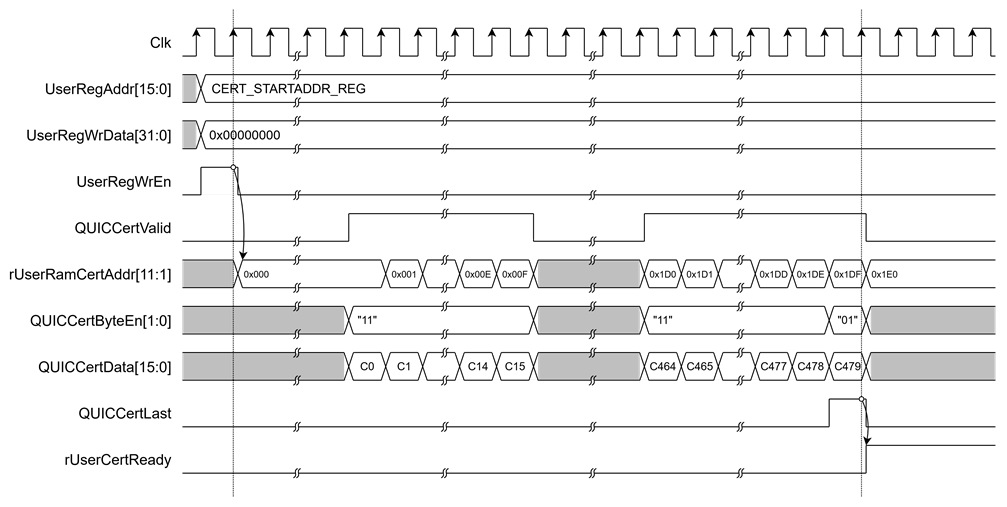
Figure 3 Example timing diagram of storing 959-byte certificate information
2.2.2 Key material information
The QUIC10GCUC-IP provides external access to the cryptographic keying material derived during packet protection. This allows users to monitor the TLS handshake state and access secrets for external cryptographic operations or debugging.
As shown in Figure 4, the key update process is controlled by the QUICKeyValid output signal. When QUICKeyValid is asserted high, it indicates that a new set of key materials has been successfully generated. At the same time, the QUIC10GCUC-IP updates the following values according to the handshake phase defined by QUICKeyType[1:0]:
· rQUICKeyReady[2:0]: A status vector reflecting the readiness of different key types.
· rRandom[255:0]: The 256-bit Random value from the ClientHello message.
· rECATS[255:0]: The Early Client Application Traffic Secret (for 0-RTT data).
· rCHTS[255:0]: The Client Handshake Traffic Secret.
· rSHTS[255:0]: The Server Handshake Traffic Secret.
· rCATS[255:0]: The Client Application Traffic Secret (for 1-RTT data).
· rSATS[255:0]: The Server Application Traffic Secret (for 1-RTT data).
Users can access rQUICKeyReady[2:0] through QUIC_KEY_VALID_REG to confirm when a parameter is ready for use.
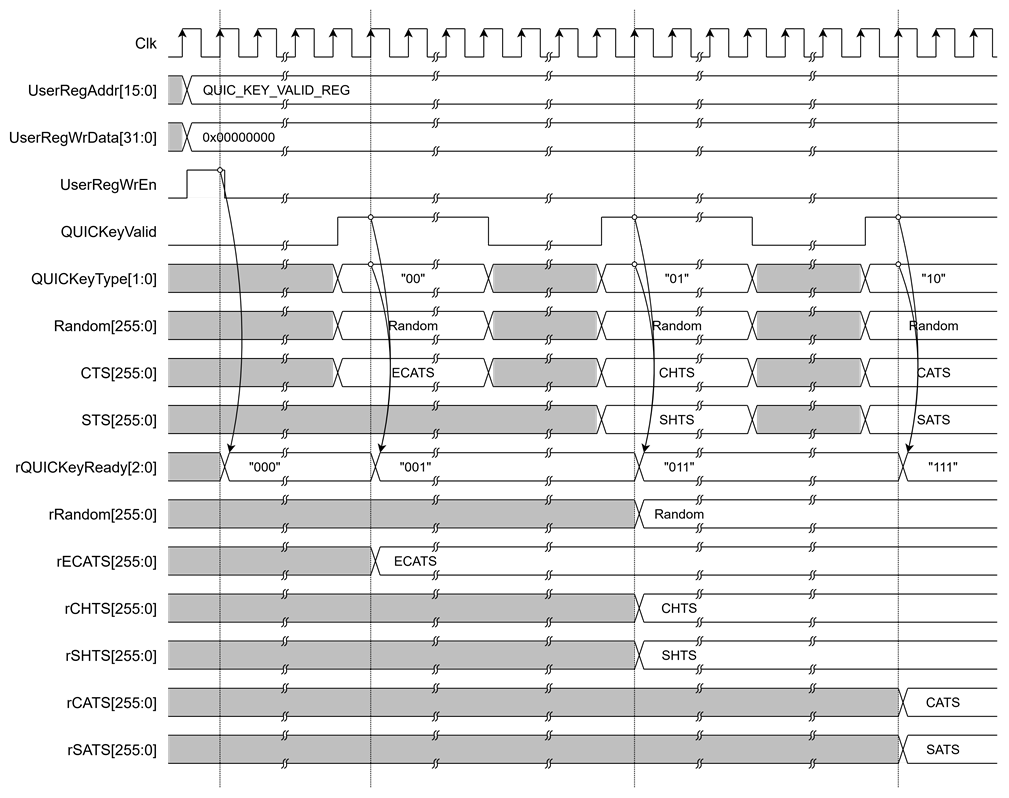
Figure 4 Example timing diagram of key material update behavior
2.2.3 AXI bridge
In the reference design, an AXI bridge is used to convert AXI protocol transactions into memory interface operations. The AXI bridge converts AXI write transactions from the QUIC10GCUC-IP to write receive data into the receive buffer (RxRam) and converts AXI read transactions from the QUIC10GCUC-IP to read transmit data from the transmit buffer (TxRam).
In the case of sending AXI write requests to the AXI bridge, AxiAwReady will be de-asserted to ‘0’, and AxiwReady will be asserted to ‘1’ in the next clock cycle. The AXI bridge will set Ram0WrAddr[21:0] to AxiAwAddr[21:0], positioning the first address to write data to RxRam. When AxiwReady is ‘1’ and the AXI master is ready to write data, the AXI master will assert AxiwValid to ‘1’. When the AXI bridge receives AxiwValid as ‘1’ from the AXI master, the AXI bridge will forward information in AxiwValid, AxiwStrb[15:0], and AxiwData[127:0] to Ram0WrEn, Ram0WrByteEn[15:0], and Ram0WrData[127:0], respectively. Ram0WrAddr[21:0] will increment by 16 for each AXI master write data word. To ensure data is written correctly, the AXI master must write data for all bytes in a word except the first or last word. When the AXI master transfers data to the last word, it must assert AxiwLast to ‘1’. When AxibReady is ‘1’ and AxibValid is ‘1’, it signifies the completion of the write data operation, and the AXI bridge will set AxiAwReady to ‘1’ in the next clock cycle to accept new write requests.
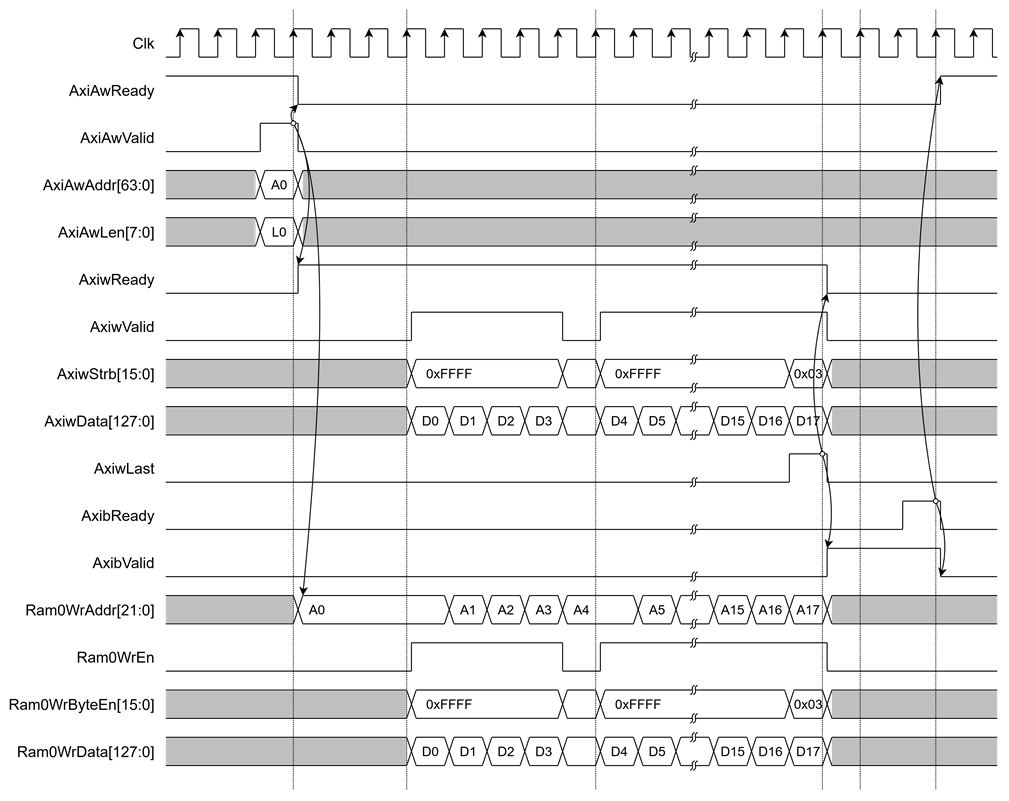
Figure 5 Example timing diagram of writing data to RxRam via AXI bridge
In the case of reading AXI read requests to the AXI bridge, AxiArReady will be de-asserted to ‘0’ in the next clock cycle. The AXI bridge will set Ram1RdAddr[21:0] to AxiArAddr[21:0], positioning the first address to read data from TxRam. The AXI bridge will read data and store it in an internal buffer, and Ram1RdAddr[21:0] will increment by 16 until the read operation is finished. When the AXI bridge is ready to transfer data to the AXI master and the AXI master is ready to receive data, the AXI bridge will assert AxirValid to ‘1’. When the AXI bridge transfers data to the last word, it will assert AxirLast to ‘1’ to specify the last cycle. When the AXI bridge sends AxirLast=‘1’ and the AXI master sends AxiRReady=‘1’, it signifies the completion of the read data operation, and the AXI bridge will set AxiArReady to ‘1’ in the next clock cycle to accept new read requests.
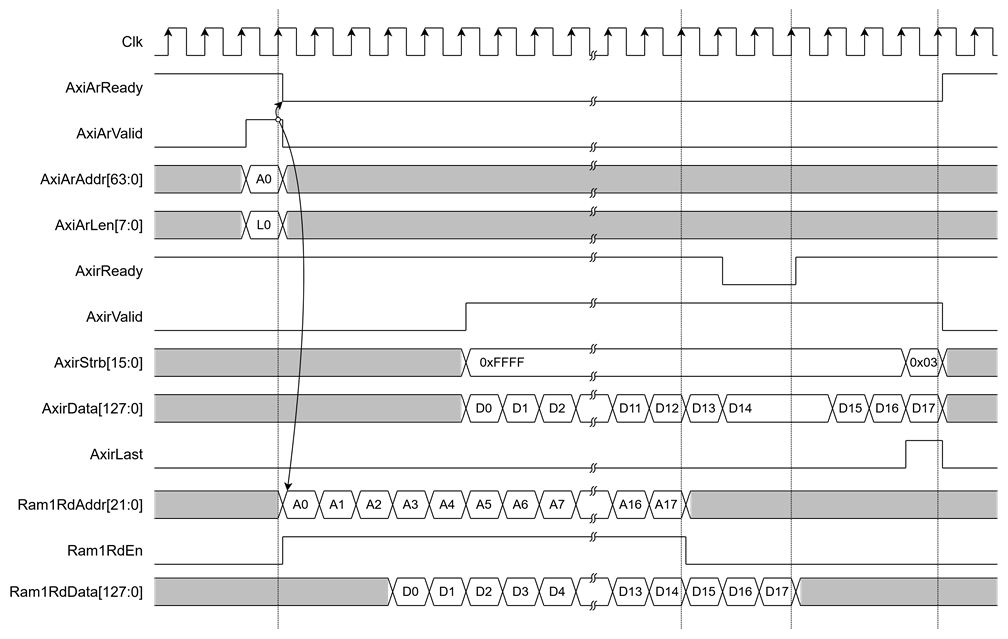
Figure 6 Example timing diagram of reading data from TxRam via AXI bridge
2.2.4 User data generator
In the reference design, a data pattern is generated and written to TxRam. There are two types of data patterns available: increasing and decreasing binary patterns. The user can set the type of data by writing to USER_TX_PATT_TYPE_REG, which is mapped to the rPattGenMode signal, supporting the generation of unaligned data. After setting the data pattern size in byte units to rPattGenLen[17:0] by writing to USER_TX_PATT_LEN_REG, the data pattern (rUserTxRamWrData[127:0]) and rUserTxRamWrByteEn[15:0] are prepared corresponding to the start address.
For example, if the user wants to generate a data pattern for transmitting data in streamID0, user can set the start address to 0x1F and set rPattGenLen[17:0] to generate a 451-byte increasing binary pattern. rUserTxRamWrData[127:120] is set to 0x00 and rUserTxRamWrByteEn[15:0] is set to 0x8000 at the first clock cycle to write data only to the highest byte at rUserTxRamWrAddr[21:4]=0x0001. At the second clock cycle, every byte of the data pattern is written. At the last clock cycle, only the last 2 bytes of the data pattern are written: rUserTxRamWrData[15:0] is set to 0xC2C1 and rUserTxRamWrByteEn[15:0] is set to 0x0003, as shown in Figure 7.
The user can check if the data pattern write to TxRam is complete by verifying that rPattGenLen[17:0]=0, which can be read from USER_TX_PATT_LEN_REG. Once the data pattern generation is complete, the user can update the write pointer (rAppTxWrAddr[0][17:0]) by writing to QUIC_TX_USER_PTR_REG0, indicating to QUIC1GC-IP that there is available Tx data to transmit. When the user wants to determine that the end of the data in the stream has been reached, they can assert rAppTxWrFin[0] to ‘1’ by writing to QUIC_TX_USER_FINAL_REG0.
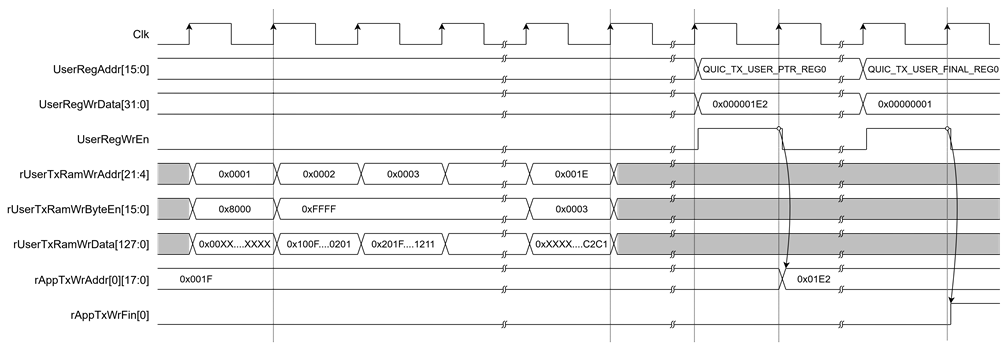
Figure 7 Example timing diagram of user data generation process
2.2.5 User data verification
In the reference design, a data verify pattern is used to verify data from RxRam. There are two types of expected data patterns: increasing and decreasing binary patterns. The user can set the type of data by writing to USER_RX_VERIFY_TYPE_REG, which is mapped to the rVerifyMode signal. This supports verifying unaligned data by reading data from RxRam via the UserRdIF. After setting the data verify size in byte units to rVerifyLen[17:0] by writing to USER_RX_VERIFY_LEN_REG, UserRdIF will read data from RxRam into VerifyRdData[127:0]. wVerifyExpData[127:0] is the expected data used for comparison, and wVerifyByteEn[15:0] is used to enable verification for each byte. wVerifyInvalid will be asserted to ‘1’ when the verification is valid but not all bytes match.
For example, if the user wants to verify a data pattern from received data in streamID0, the user can set the start address to 0x1F and set rVerifyLen[17:0] to verify a 451-byte increasing binary pattern. UserRdIF will read data from RxRam into VerifyRdData[127:0] and compare it with wVerifyExpData[127:0] when wVerifyByteEn is active. At the last clock cycle, only the last 3 bytes of the data pattern are verified, wVerifyByteEn[15:0] is set to 0x0007, and wVerifyExpData[23:0] is set to 0xC2C1C0, as shown in Figure 8.
The user can check if the data pattern verification from RxRam is complete by verifying that rVerifyLen[17:0]=0, which can be read from USER_RX_VERIFY_LEN_REG. Once the data pattern verification is complete, the user can update the read pointer (rAppRxRdAddr[0][17:0]) by writing to QUIC_RX_USER_PTR_REG0, indicating to QUIC1GC-IP that the data has been processed. If the other endpoint requests to close streamID0, the QUIC1GC-IP will set AppRxWrFin[0] to ‘1’, which can be read from QUIC_RX_USER_FINAL_REG0.
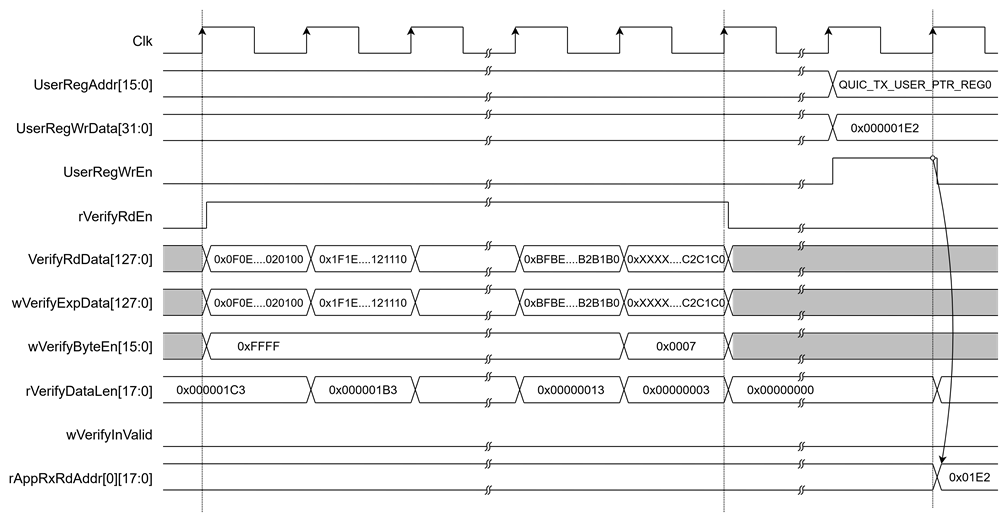
Figure 8 Example timing diagram of user data verification process
2.2.6 Memory allocation for user streams
The QUIC10GCUC-IP does not perform dynamic memory management. Instead, users must allocate a continuous block of FPGA memory space for both transmit and receive buffers. The base addresses for each direction are configured through AppTxBaseAddr[63:0] and AppRxBaseAddr[63:0], respectively.
In this reference design, the FPGA memory is partitioned into fixed-size buffers for each stream. Each stream is assigned a 256 KB region and the total number of streams is 16.
Table 2 Example Buffer Mapping per Stream
|
Stream ID |
Tx Address Range (Offset from |
Rx Address Range (Offset from |
Type |
|
0 |
0x000000 – 0x03FFFF |
0x000000 – 0x03FFFF |
Client-initiated, bidirectional |
|
1 |
0x040000 – 0x07FFFF |
0x040000 – 0x07FFFF |
Server-initiated, bidirectional |
|
2 |
0x080000 – 0x0BFFFF |
0x080000 – 0x0BFFFF |
Client-initiated, unidirectional |
|
3 |
0x0C0000 – 0x0FFFFF |
0x0C0000 – 0x0FFFFF |
Server-initiated, unidirectional |
|
4 |
0x100000 – 0x13FFFF |
0x100000 – 0x13FFFF |
Client-initiated, bidirectional |
|
5 |
0x140000 – 0x17FFFF |
0x140000 – 0x17FFFF |
Server-initiated, bidirectional |
|
6 |
0x180000 – 0x1BFFFF |
0x180000 – 0x1BFFFF |
Client-initiated, unidirectional |
|
7 |
0x1C0000 – 0x1FFFFF |
0x1C0000 – 0x1FFFFF |
Server-initiated, unidirectional |
|
8 |
0x200000 – 0x23FFFF |
0x200000 – 0x23FFFF |
Client-initiated, bidirectional |
|
9 |
0x240000 – 0x27FFFF |
0x240000 – 0x27FFFF |
Server-initiated, bidirectional |
|
10 |
0x280000 – 0x2BFFFF |
0x280000 – 0x2BFFFF |
Client-initiated, unidirectional |
|
11 |
0x2C0000 – 0x2FFFFF |
0x2C0000 – 0x2FFFFF |
Server-initiated, unidirectional |
|
12 |
0x300000 – 0x33FFFF |
0x300000 – 0x33FFFF |
Client-initiated, bidirectional |
|
13 |
0x340000 – 0x37FFFF |
0x340000 – 0x37FFFF |
Server-initiated, bidirectional |
|
14 |
0x380000 – 0x3BFFFF |
0x380000 – 0x3BFFFF |
Client-initiated, unidirectional |
|
15 |
0x3C0000 – 0x3FFFFF |
0x3C0000 – 0x3FFFFF |
Server-initiated, unidirectional |
2.2.7 HTTP/3 minimum stream requirement compliance
According to RFC 9114 - HTTP/3, a compliant HTTP/3 implementation must support at least three client-initiated bidirectional streams for concurrent HTTP request/response pairs, and at least three client-initiated unidirectional streams for protocol-level control (e.g., Control, QPACK encoder, and QPACK decoder streams).
This reference design supports 16 streams total, with each stream assigned a fixed 256 KB buffer in FPGA memory. The stream types are automatically determined by the two least significant bits of the Stream ID (StreamID[1:0]):
· 00 — Client-initiated, bidirectional
· 01 — Server-initiated, bidirectional
· 10 — Client-initiated, unidirectional
· 11 — Server-initiated, unidirectional
With 16 streams, the system supports up to:
· bidirectional client streams (StreamIDs 0, 4, 8, 12)
· unidirectional client streams (StreamIDs 2, 6, 10, 14)
This ensures that the design is fully compliant with the HTTP/3 minimum stream requirements. For detailed stream management rules, refer to https://datatracker.ietf.org/doc/html/rfc9114#section-6
2.3 Ethernet subsystem
The Ethernet Subsystem operates across multiple protocol layers, including the MAC (Media Access Control), PCS (Physical Coding Sublayer), and PMA (Physical Medium Attachment) layers. These layers work for interface with external devices using the 10GbE standard. The QUIC10GCUC-IP communicates with the Ethernet MAC via a 64-bit Avalon streaming interface.
2.3.1 Ethernet Hard IP on Agilex 5
The Agilex 5 devices integrate GTS Ethernet FPGA Hard IP, which implements Ethernet MAC, PCS, and PMA functions. Further information on the GTS Ethernet FPGA Hard IP can be found in the following links:
https://www.altera.com/products/ip/po-3077/gts-ethernet-hard-ip
3 CPU firmware
After system boot-up, CPU initializes its peripherals such as UART and Timer. Then the supported command usage is displayed. The main function runs in an infinite loop to receive line command input from the user. Users can set the network and connection parameter, display key materials and certificate information, download/upload data and test performance using the supported commands. More details of the sequence in each command are described as follows.
3.1 Set Gateway IP address
command> setgatewayip ddd.ddd.ddd.ddd
Users can set a Gateway IP address for the QUIC10GCUC-IP by inputting setgatewayip followed by the desired Gateway IP address in dotted-decimal format. The setip function is called to change the Gateway IP address value in netparam variable. This variable will be written to the register mapped to GatewayIPAddr to set the FPGA’s IP address. Subsequently, the QUIC10GCUC-IP is initialized with the current network parameter setting. The default Gateway IP address is 0.0.0.0. The setip function is described in Table 3.
3.2 Set FPGA IP address
command> setip ddd.ddd.ddd.ddd[/nn]
This command configures the IP address and subnet mask for the QUIC1GC-IP. Users must input setip followed by the desired IPv4 address in dotted-decimal format. Optionally, the subnet mask can be specified in CIDR notation (e.g., /24). If the CIDR suffix is omitted, a default value of /24 is applied. The setip function updates the IP configuration parameters in the netparam variable, which are then written to the hardware registers mapped to SrcIPAddr[31:0] and SubnetMask[4:0]. This sets the FPGA’s static IP address and network prefix length. After the register write operation completes, the QUIC10GCUC-IP is reinitialized with the new network parameters. The default FPGA IP configuration is 192.168.7.42/24. The setip function is described in Table 3.
Table 3 setip function
|
int setip(uint8_t *string, uint32_t *ip_set) |
|
|
Parameter |
string: ip address as string input from user ip_set: array stored IP address |
|
Return value |
0: Valid input, -1: Invalid input |
|
Description |
This function receives IP Address as string input and sets value of ip_set array. |
3.3 Set FPGA MAC address
command> setmac hh-hh-hh-hh-hh-hh
Users can set a MAC address to the QUIC10GCUC-IP by inputting setmac followed by the FPGA’s MAC address in hexadecimal format. The setmac function is called to change the MAC address value in netparam variable. This array will be written to the register mapped to SrcMacAddr to set the FPGA’s MAC address. The default FPGA’s MAC address is 80-01-02-03-04-05. The setmac function is described in Table 4.
Table 4 setmac function
|
int setmac(uint8_t *string, uint64_t *mac_set) |
|
|
Parameter |
string: MAC address as string input from user mac_set: array stored mac address |
|
Return value |
0: Valid input, -1: Invalid input |
|
Description |
This function receives MAC Address as string input and sets value of mac_set array. |
3.4 Load network parameters
command> loadnetworkparameters
This command configures network parameters and must be run before connecting to the network. When executed, it sets the current Gateway IP address, FPGA’s IP address, subnet mask, and FPGA’s MAC address to the QUIC10GCUC-IP while the NetworkSet signal is asserted to ‘1’.
3.5 Set FPGA port number
command> setport ddddd
Users can set a port number to the QUIC1GC-IP by inputting setport followed by the static port number of the FPGA in decimal format or “dynamic”, “d” or “-d” to set the port number to be dynamic. The setport function is called to change the port number value in netparam variable. This variable will be written to the register mapped to SrcPort to set the FPGA’s port number. Dynamic ports are in the range 49152 to 65535. If the port number is set to be dynamic, the port number will be automatically increased by 1 before establishing a new connection. If the port number is set as a static port number and the user does not set the new port number value, the FPGA’s port number will not be changed. The setport function is described in Table 5.
Table 5 setport function
|
int setport(uint8_t *string, uint64_t *port_set) |
|
|
Parameter |
string: port number as string input from user port_set: array stored port number |
|
Return value |
0: Valid input, -1: Invalid input |
|
Description |
This function receives port number as string input and sets value of port_set array. |
3.6 Show key materials
command> showkey <1: enable, 0: disable>
*Wireshark, a network packet analyzer tool used for network troubleshooting, analysis, and security purposes.
3.7 Show certificate information
command> showcert <1: enable, 0: disable>
To change showcert mode, users can input showcert <1: enable, 0: disable> to modify a global variable, bshowCertificate. If bshowCertificate is set to true, certificate information will be displayed on the serial console after the certificate is ready during the handshake phase. Users can use the certificate information for further certificate validity verification.
3.8 Show session parameters
command> showsessionparams <1: enable, 0: disable>
To change the session parameter display mode, users can input showsessionparams <1: enable, 0: disable> to modify a global variable, bshowSessionParams. If bshowSessionParams is set to true, the negotiated session parameters for 0-RTT resumption will be displayed on the serial console after they are received from the server and stored. This information is essential for debugging the QUIC transport layer and verifying the parameters that will be used for future Zero-RTT connection attempts.
When enabled, the following session parameters are displayed:
· Server Name: The target server for the session.
· Initial Flow Control Limits:
o InitMaxData: The initial maximum data allowed on the connection.
o InitMaxStreamDataBiLocal: The initial maximum data for locally-initiated bidirectional streams.
o InitMaxStreamDataBiRemote: The initial maximum data for remotely-initiated bidirectional streams.
o InitMaxStreamDataUni: The initial maximum data for unidirectional streams.
· Initial Stream Count Limits:
o InitMaxStreamBi: The maximum number of concurrent bidirectional streams.
o InitMaxStreamUni: The maximum number of concurrent unidirectional streams.
· Pre-Shared Key (PSK) Identity: The 32-byte PSK identity (PreSharedKey).
· New Session Ticket Details:
o TicketLifetime: The lifetime of the ticket in seconds.
o TicketAgeAdd: The obfuscation value for the ticket age.
o TicketLength: The length of the ticket value in bytes.
o TicketValue: The session ticket itself (displayed in hexadecimal, truncated if longer than 32 bytes).
· TimeStamp: A timestamp indicating when the parameters were stored.
3.9 Download data pattern with HTTP GET command
command> myGET https://hostname[:port]/urlpath
Where hostname represents the server’s domain name or IP address in dot-decimal notation
port represents server’s port number
size represents the path to the desired resource on the server
This command simulates an HTTP GET request over QUIC to download data from a server. The myGET function processes the input URL, configures network and protocol parameters, initializes registers, and manages the data reception sequence.
If the user specifies a domain name as the hostname, the function first checks for a match in the local hostname-to-IP mapping table. If a match exists, the corresponding IP address is used. If no match is found, the user is prompted to manually enter the IP address, which is then stored in the mapping table for future use.
If the user does not specify a port number, the default port 443 is automatically selected.
If valid 0-RTT parameters for the target server are available in the local storage, the function will automatically attempt to open the connection using 0-RTT resumption. This reduces the handshake latency by eliminating a full round trip before sending application data.
The detailed operation of the myGET function is as follows:
· Split the URL input and set network parameters corresponding to the URL.
· Construct an HTTP GET command from the URL.
· Open connection and wait for the handshake process to finish.
· Copy the HTTP GET command into the transmit buffer and update the write pointer using QUIC_TX_USER_PTR_REG to initiate the GET request over QUIC.
· Monitor HTTP header response and validate HTTP data length.
· During data reception, the software updates the read pointer via QUIC_RX_USER_PTR_REG as data arrives. It accumulates the total received length and checks for stream completion.
· Compute and display transfer speed on the serial console until the reception of data is complete. If the received data length is less than 4 kB, the received data will also be shown on the serial console.
Table 6 myGET function
|
int myGET(uint8_t *string) |
|
|
Parameter |
string: URL as string input from user |
|
Return value |
0: Valid input, -1: Invalid input |
|
Description |
This function receives URL as string input and validates URL. Monitor and display receiving result. |
3.10 Upload data pattern with HTTP POST command
command> myECHO https://hostname[:port]/echo size
Where hostname represents the server’s domain name or IP address in dot-decimal notation
port represents server’s port number
size represents data length in byte
This command simulates POST method of HTTP to upload data pattern to the server. myECHO function is called to extract the server’s IP address and the server’s port number, set registers to start data generator and verify data pattern, monitor status. The sequence of the myECHO function is as follows
· Split the URL input and set network parameters corresponding to the URL.
· Construct an HTTP POST command from the URL and request size.
· Open connection and wait for the handshake process to finish.
· Copy the HTTP POST command into the transmit buffer. If requestSize is greater than zero, configure USER_TX_PATT_LEN_REG to generate pattern data in TxRam. Move rAppTxWrAddr[0][17:0] by writing to QUIC_TX_USER_PTR_REG, repeating this process in chunks until the entire requestSize is transmitted. Once completed, write to QUIC_TX_USER_FINAL_REG to mark the end of stream.
· Monitor HTTP header response, validate HTTP data length.
· Enter the receive data phase. As data is received, set USER_RX_VERIFY_LEN_REG to initiate data pattern verification from RxRam, update the read pointer using QUIC_RX_USER_PTR_REG, and track the total received length.
· Compute and display transfer speed on the serial console until the reception of data is complete. If the received data length is less than 4 kB, the received data will also be shown on the serial console.
Table 7 myECHO function
|
int myECHO(uint8_t *string, uint8_t *reqSize) |
|
|
Parameter |
urlStr: URL as string input from user reqSize: Upload length as string input from user |
|
Return value |
0: Valid input, -1: Invalid input |
|
Description |
This function receives a URL string input from the user, validates it, constructs an HTTP POST command, and sends it before transferring data to the server. It monitors the number of transferred data bytes to show the transfer speed. |
3.11 Upload and Download data pattern like secnetperf
command> myPERF hostname[:port] uploadlength downloadlength
Where hostname represents the server’s domain name or IP address in dot-decimal notation
port represents server’s port number
uploadlength represents upload data length in byte
downloadlength represents download data length in byte
This command uses for performance testing using the unique application protocol with MsQuic. myPERF function is called to extract the server’s IP address and the server’s port number, set registers to start data generator and verify data pattern, monitor status. The sequence of the myPERF function is as follows.
· Split the URL input and set network parameters corresponding to the URL.
· Open connection and wait for finishing handshake process.
· Write the downloadlength to transmit buffer for request download data from MsQuic
· If uploadSize is greater than zero, pattern data is generated into the transmit buffer by configuring USER_TX_PATT_LEN_REG. The write pointer is updated using QUIC_TX_USER_PTR_REG, repeating the operation in chunks until the entire uploadSize is generated in TxRam. After the final chunk, QUIC_TX_USER_FINAL_REG is written to mark the end of stream, and completion is monitored through QUIC_BUSY_REG.
· If downloadSize is greater than zero, pattern verification of received data is initiated by writing USER_RX_VERIFY_LEN_REG. The read pointer is updated using QUIC_RX_USER_PTR_REG, and the accumulated received length is tracked continuously. QUIC_RX_USER_FINAL_REG is used to detect the end of stream condition, and an error is reported if the verified length exceeds downloadSize or if verification fails.
· Compute and display transfer speed on the serial console until the reception of data is complete. If the received data length is less than 4 kB, the received data will also be shown on the serial console.
Table 8 myPERF function
|
int myPERF(uint8_t * netAddress, uint8_t * upSize, uint8_t * downSize) |
|
|
Parameter |
netAddress: URL as string input from user upSize: Upload length as string input from user downSize: Download length as string input from user |
|
Return value |
0: Valid input, -1: Invalid input |
|
Description |
This function receives parameter string input by the user, validates the parameters before transferring data to the server, and monitors the number of transferred data to show the transfer speed. |
4 Revision History
|
Revision |
Date (D-M-Y) |
Description |
|
1.00 |
21-Apr-26 |
Initial version release |